How to run the mock snmp device
The SNMP mock
The snmp mock is an UDP server mocking a device using SNMP with an mock MIB file (./dev/TNO-PDU-MIB.txt) and providing the following metrics tnoPduEnergyValue and tnoPduPowerValue. This file details how to set up the mock device, and how to subsequently run a demo with it including both the PhysicalMeasurement and MeasurementDevice custom resources.
requirements
Ensure you have followed the instructions in How to set up the local development environment to set up a local development environment. After this:
- The development cluster is running.
- The controller is running (locally via
make runor in-cluster). - Port-forwarding is active (
./dev/port-forward.sh).
Build and load the snmp-mock image into the kind environment
Apply the mock to Kubernetes
Querying the chantico-snmp-mock running in the development setup
If the development kind cluster is running the chantico-snmp-mock service, there is a Node Port that is visible on port 31161.
It can be queried as follow:
Chantico workflow with the snmp-mock as snmp device (full demo)
For an overview of the workflow that is run in the background in this demo please see the below image.
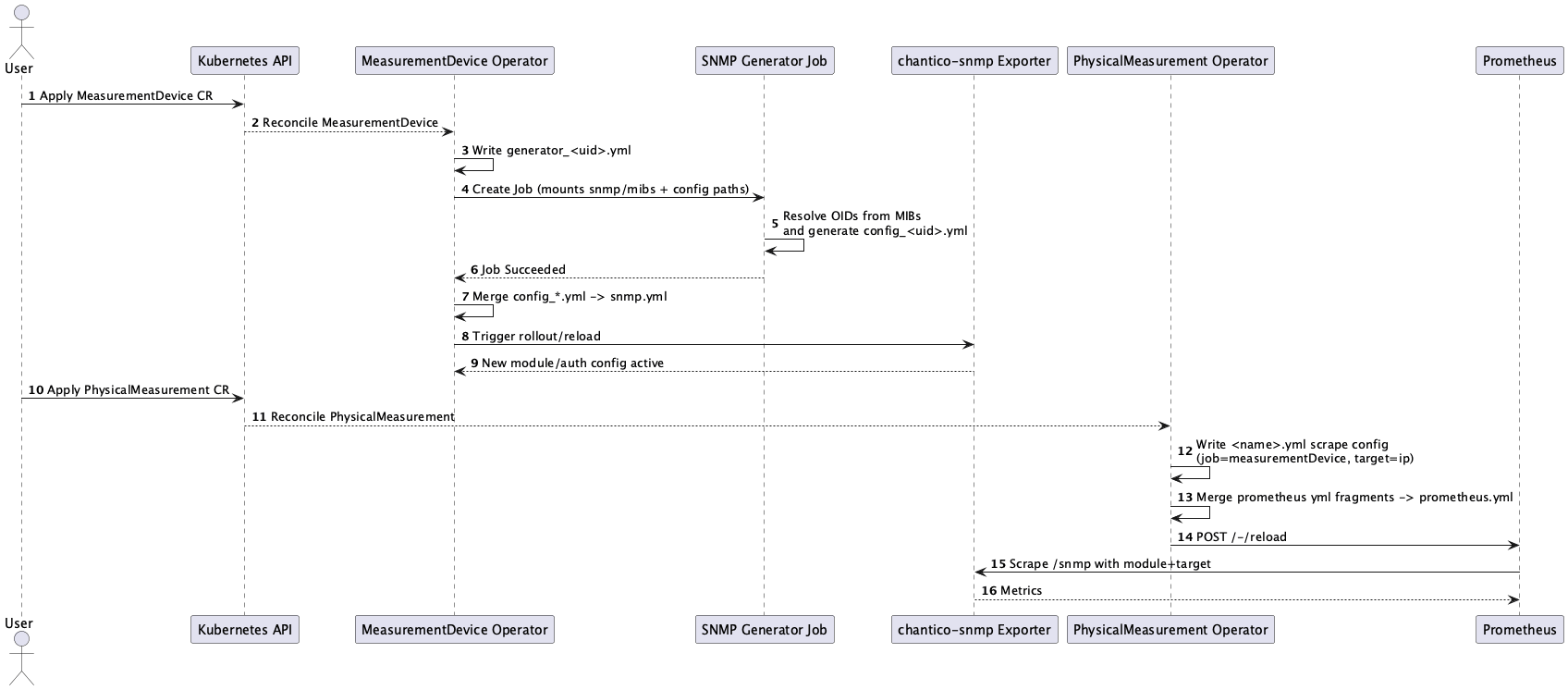
This section demonstrates a full flow: MIB upload → MeasurementDevice → PhysicalMeasurement → Prometheus targets.
-
Login in the web UI of
chantico-filebrowser,localhost:18888and Upload./dev/TNO-PDU-MIB.txtto./snmp/mibs/TNO-PDU-MIB.txt -
Create a
MeasurementDevicefor the mock MIB:
- Wait for the SNMP generator job:
- Create a
PhysicalMeasurementpointing at the mock target:
- Port-forward Prometheus and verify targets:
Open http://localhost:9090/targets and verify the target is UP.
Adding another mock snmp device
The same mock SNMP image can be deployed multiple times to simulate additional devices. Each additional device needs its own Deployment, Service, MeasurementDevice, and PhysicalMeasurement. Example manifests for a second mock device are provided in the repository.
- Deploy the second mock SNMP agent:
- Create a second
MeasurementDevice(can reuse the same MIB/walks, or use different ones):
- Wait for the SNMP generator job for the new device:
- Create a second
PhysicalMeasurementpointing at the new mock target:
- Verify both targets appear in Prometheus:
Open http://localhost:9090/targets — both the original and the new target should show as UP.
The second mock is exposed on NodePort 31162, so you can also query it directly:
Tip: To add more devices beyond the second, copy the mock-2 manifests, update the names (e.g.
chantico-snmp-mock-3), pick a free NodePort, and create correspondingMeasurementDevice/PhysicalMeasurementresources. Prometheus will automatically pick up new targets viafile_sd_configs— no restart required.